


Like other Take Risks Be Happy posts, this post may include affiliate links that do not affect our editorial judgement. As an Amazon Associate I earn from qualifying purchases.
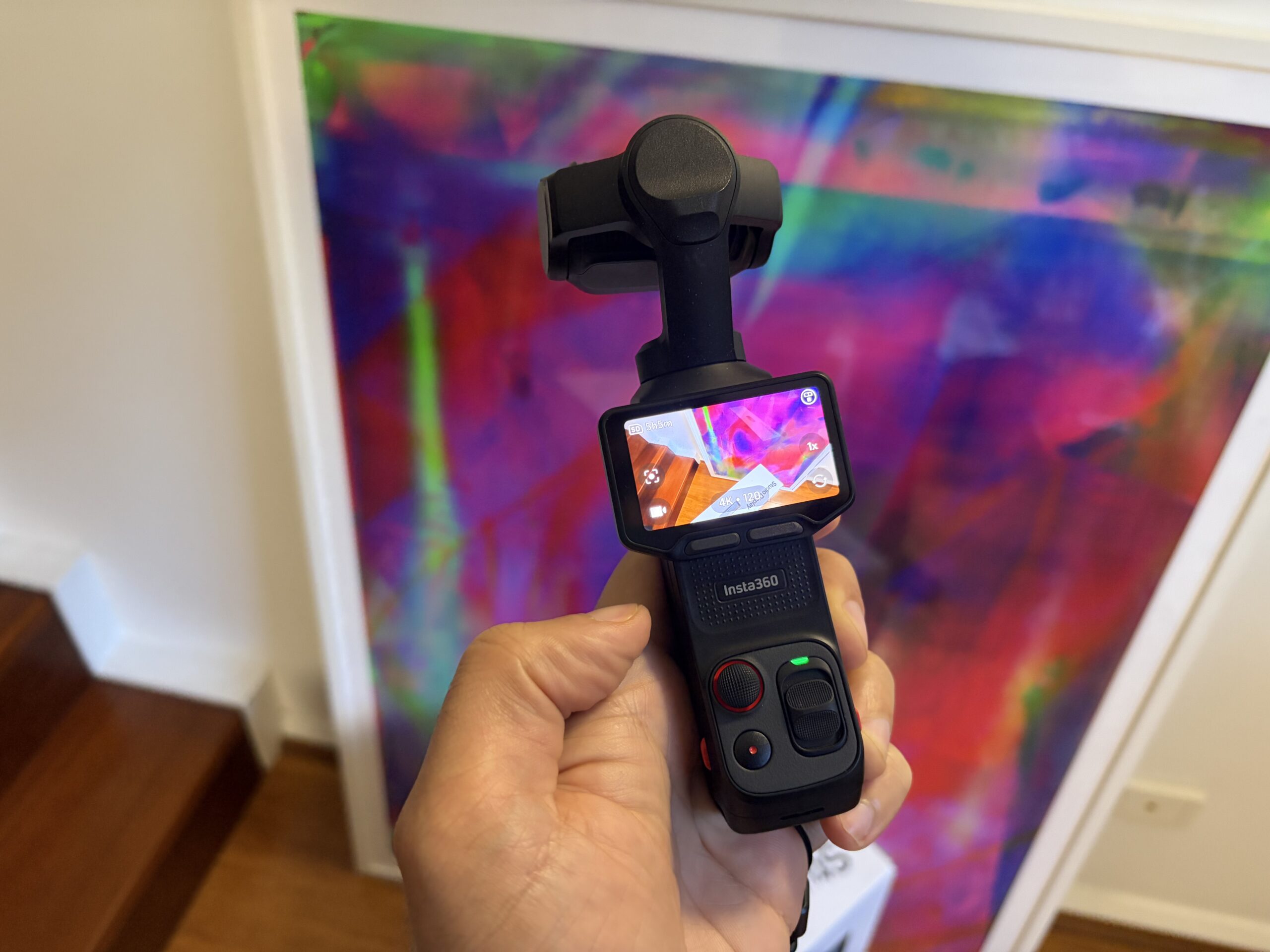
The Insta360 Luna Ultra is a fantastic handheld camera I purchased a few weeks ago. Basically, it’s the easiest way for beginners/amateurs to shoot pro-quality footage without much effort. That’s the point of this camera, and that’s what it does extremely well.
I like it so much, that if I had it lost or stolen today, the first thing I would do tomorrow is buy another one. (I’m not joking)
This review is designed to help you decide whether the camera will help you shoot great videos, even if you don’t know what 8K i-Log is. It’s built around a simple question: Is this camera awesome if you just want to take great video, and do it easily?
This video was filmed 100% on the Luna Ultra, and I’m a total beginner.
Can Beginners Use the Luna Ultra and Get Great Footage?
Other reviewers can talk about the technology behind the camera, but I actually have a simpler way of looking at this: Can a total beginner use it to shoot pro-quality or near pro-quality footage, with almost no technical knowledge?
The answer is yes, which is why I love it. Check out the video above. It was filmed entirely on the Luna Ultra and I barely know what I am doing. I’m not a video pro, and I’m not ashamed to admit that.
The Luna Ultra lets you shoot in 4K or 8K, which is more than enough for 99.9% of use cases. And if you don’t know what 4K or 8K means, don’t worry. The point is, the footage looks great.
Much like the Fujifilm series of digital cameras, the Luna Ultra has preset modes that allow you to choose a setting that affects how the footage looks. I use Cinematic mode.
You can shoot in something called i-Log, which creates flat footage but gives you the flexibility to later color grade or change the look of footage. But for me, and for most people, I presume, I don’t even bother. I just get great-quality footage directly from Cinematic mode.
The camera also has a mechanical gimbal, which means it physically stabilizes the footage as you move around. This makes an enormous difference when walking, and it helps your videos look professional without having to learn anything about stabilization.
Basically, you can turn the Luna Ultra on, select a color mode you like, and start recording. You don’t need to know anything about professional filmmaking to get genuinely great results.
What’s the Difference Between the Insta360 Luna Ultra and Luna Pro?
The Insta360 Luna Pro was released in September 2026, three months after the Ultra, and costs $599.99 USD compared with $769.99 for the Ultra. At 1x zoom, footage from the Luna Ultra and the Luna Pro should be indistinguishable. The example video above is shot on a Luna Ultra, but at 1x, so that is what the Luna Pro will look like.
The biggest difference is the lenses. The Luna Pro has a single 1x lens, while the Ultra has both a 1x and 3x telephoto lens. That means the Ultra is much more versatile when filming things in the distance.
Otherwise, the cameras are surprisingly similar. Both shoot up to 8K, have excellent mechanical stabilization, a 1-inch main sensor, and the same detachable touchscreen remote. The Pro is also slightly smaller and lighter. For beginners, I think the decision is pretty simple. If you don’t care about zoom, save the $170 and get the Luna Pro.You’ll still get fantastic footage, and you won’t have to learn anything more complicated to use it.
Personally, I really like having the 3x telephoto lens, especially for travel, so I’d spend the extra money on the Ultra. But if you’re mostly filming yourself, making YouTube videos, or recording everyday memories, the Luna Pro is probably all you need.
What about the Creator Bundle?
The Luna Ultra comes in a standard set or in a Creator Bundle. The creator bundle is $200 more. I got the creator bundle, because I wanted the battery and the mic pro, which are both awesome, but in retrospect, since I bought the full mic set anyway, I should’ve just got the regular set, added a battery, and got a Mic Pro set separately.
This was shot on the Luna Ultra both at 1x and 3x zoom, depending on the shot.
How Good Is the Luna Ultra’s Zoom?
One of the best things about the Luna Ultra is its zoom, but beginners need to understand something important. The Luna Ultra has two lenses: a 1x lens and a 3x telephoto lens. Everything else involves digital cropping, which means not every zoom level looks equally good.
In my experience, footage looks fantastic at 1x and 3x, very good at 2x and perhaps 4x or 5x, good at 6x, and just okay at 12x or above. Technically, Insta360 also considers 2x and 6x lossless at 4K, but the native optical lenses are at 1x and 3x. Beginners might assume that because the camera offers every zoom level from 1x to 15x, they’re all equally good. They’re not. In fact, 3x will often look better than 2.5x because you’re switching to the actual telephoto lens.
A September 2026 software update increased the maximum zoom from 12x to 15x, although I wouldn’t recommend regularly filming at those extremes.
My advice? Stick primarily to 1x and 3x, experiment with 2x and 6x, and treat everything beyond that as a bonus.
Is Luna Ultra Footage Higher Quality Than iPhone Footage?
The answer is almost always going to be yes. The gimbal means the footage is stabilized, and the lenses and sensor sizes mean you just get great images. The newest iPhones are no slouch, especially the 18 Pro series, but the Luna still has a clear edge in my experience.
Luna Ultra footage is generally smoother and clearer, and it has a cinematic quality that iPhone footage doesn’t quite have.
The Luna is also easier to hold. Its stick-like form factor is much more comfortable for filming while walking than the iPhone’s wide, thin shape.
Of course, you can take excellent videos with an iPhone, and if you already have a Pro model, you probably don’t need another camera. But I think the Luna Ultra is a genuinely worthwhile upgrade if you enjoy recording your travels.

How Useful Is the Detachable Remote?
One of my favorite Luna Ultra features is its detachable 2-inch touchscreen, which doubles as a wireless remote. You can put the camera on a tripod, walk away, and still see exactly what you’re recording. You can start or stop filming, change settings, and even use the remote as a wireless microphone.
Insta360 advertises a range of up to 20 meters (65 feet), which is more than enough for most situations. This is particularly useful for beginners making YouTube videos or anyone traveling alone. You can film yourself without constantly returning to the camera to check whether you’re properly framed.
I think this is one of the strongest reasons to choose the Luna Ultra over some competing cameras.
What Colors Does the Luna Ultra Come In?
White and black. I like the white most, actually, but I went with the black to keep it low profile.

Is the Luna Ultra Better Than the DJI Osmo Pocket 4?
I’ve only used the DJI Osmo Pocket 4 extremely briefly—I used it for a few minutes at a cafe because a friend bought one—and I can say from seeing his footage and from seeing YouTube videos, they are honestly about the same.
Some YouTube videos give the Osmo a slight edge, especially in low light, but I think for most beginners, you’ll love either one.
Of course, if you’re already in the DJI ecosystem with their Mic systems, you probably want to go with a DJI camera. Likewise, if you already have the Insta360 Mic Pro or Mic Air, you’ll probably prefer the Luna.
What’s the Difference Between the Luna Ultra and DJI Osmo Pocket 3 and Osmo Pocket 4?
While the Luna is comparable in quality to the DJI Osmo Pocket 4, the biggest difference is that the Luna Ultra and Luna Pro feature a detachable remote, which can be used for creative solo shots.
The Luna Ultra also has two lenses, including a 3x telephoto lens, whereas the standard DJI Osmo Pocket 4 has one lens and relies on cropping for zoom. The Luna also shoots up to 8K, compared with 4K for the DJI.
The standard Pocket 4 is considerably cheaper, though, so if you don’t need optical zoom or a detachable remote, it’s an attractive alternative.
There is also a more expensive DJI Osmo Pocket 4P, which adds a second telephoto lens and is a much closer competitor to the Luna Ultra. It’s worth comparing those two if zoom is important to you. Meanwhile, the DJI Osmo Pocket 3 is cheaper than the Luna Ultra, but is a fantastic starter camera if you cant justify spending $700. Due to international restrictions, the Osmo Pocket 4 is not currently widely available in the United States. If you’re American and worried about lacking the DJI, don’t be. The Luna is awesome. Just get the Luna.
And if you’re looking to spend even less, the older DJI Osmo Pocket 3 remains an excellent camera. For someone who just wants beautiful, stabilized video and doesn’t particularly care about zoom, it might be all you need.

What’s the Cheapest Way to Get the Luna Ultra?
The Insta360 Luna Ultra was released on June 10, 2026, with a US list price of $769.99 and due to its popularity, it often stays near that price. Check the best price on Amazon for special sales, and consider signing up for Rakuten, a cash back shopping service. New users get a $50 bonus after a $50 qualifying purchase, you can sign up with our Rakuten affiliate link or with code ALEX3954. (More on cash back with Rakuten in our review). I purchased my Luna in Japan—read our Japan tax-free shopping guide here—but the discounts on the Insta360 Luna on Amazon mean I could’ve gotten it in the States for a similar price with much less effort.
There’s also a Creator Bundle, which includes a wireless microphone, battery handle, wide-angle lens, and other accessories. It’s a nice package, but I wouldn’t automatically spend the extra money unless you know you’ll use those things.
Which Luna Ultra Accessories Are Worth Buying?
Insta360 sells quite a few accessories. Some are useful, but others don’t really change the experience very much.
- Wide-Angle Lens: Gives you a slightly wider field of view, which is helpful in tight spaces. But the difference is relatively small, and I wouldn’t rush out to buy it separately.
- Black Mist Filter: Pretty cool, actually. It softens bright lights and gives footage a slightly dreamy, cinematic look. I like it, but it’s not a game changer.
- Battery Handle: Probably more useful than either lens accessory if you’re filming for long periods.
- Insta360 Mic Pro: A good upgrade if you’re making YouTube videos or speaking to the camera. Clear audio is important, and I’d prioritize a microphone over either of the lens attachments.
My recommendation is to start with the camera and a good memory card, then add accessories once you know what you actually need.
As a reminder, we are part of Amazon associates, and earn from qualifying purchases through affiliate links.
What SD Card Should You Use With the Luna Ultra?
The Luna Ultra has 47GB of built-in storage, which is enough to get started, but you’ll probably want a microSD card. I’d recommend a SanDisk Extreme 256GB or 512GB microSDXC card, rated UHS-I, U3, and V30. (I don’t know or care what those numbers mean, but you can’t cheap out here, make sure whatever you have is that specification, since a slower card will hurt your footage and possibly fail). That’s fast enough for high-quality video, and you don’t need to pay extra for an expensive professional card.
I’d personally go with 512GB if you’re recording lots of 4K footage while traveling. The camera supports cards up to 2TB, but most people won’t need anything close to that.

Are There Any Downsides?
The biggest downside is the price. Spending nearly $770 on another camera is a lot of money if you already own a good smartphone. The Luna Ultra also isn’t waterproof, so you can’t treat it like an action camera. And while the mechanical gimbal is fantastic, you do have to be somewhat careful with it.
Finally, remember that although the camera makes filming much easier, it doesn’t automatically make every video interesting. You still need to point it at something worth recording, and you’ll need to do some editing if you’re creating a proper YouTube video. But for someone who wants beautiful footage without having to learn all the technical details of professional filmmaking, I think these are pretty minor drawbacks.

Conclusion: Is the Insta360 Luna Ultra Worth Buying for Beginners?
Yes. Absolutely.
The entire point of the Luna Ultra, for me, is that you can shoot genuinely fantastic footage without knowing anything about professional filmmaking. You don’t need to know what 8K i-Log is, you don’t need to spend hours color grading, and you don’t need expensive lenses or a complicated camera setup. You can basically turn it on and take great videos.
The detachable remote, fantastic stabilization, and 3x telephoto lens are genuinely useful, particularly for travel, and the quality of the footage is impressive even when you’re using the automatic settings.
If you’re already happy with your iPhone, or you don’t care about the extra zoom, a cheaper DJI camera might make more sense. But if you want to shoot beautiful travel videos, make YouTube content, or simply record great memories without becoming a professional videographer, I highly recommend the Insta360 Luna Ultra. If I had it lost or stolen today, the first thing I would do tomorrow is buy another one.
It’s great for memories even if you aren’t making videos for anyone else. Love this thing.


Leave a Reply